Best Crypto Portfolio Trackers in 2026: Complete Setup Guide
Manage all your crypto holdings in one place with the right tracking tool As the crypto market matures in 2026, managing a diversified portfolio across multiple exchanges, wallets, and DeFi protocols has become increasingly complex.
Best Crypto Portfolio Trackers in 2026: Complete Setup Guide
Manage all your crypto holdings in one place with the right tracking tool
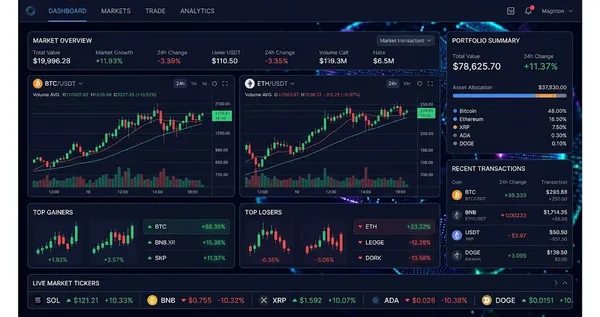
As the crypto market matures in 2026, managing a diversified portfolio across multiple exchanges, wallets, and DeFi protocols has become increasingly complex. A good portfolio tracker aggregates all your holdings into a single dashboard, showing real-time values, profit and loss calculations, and historical performance without requiring you to check each platform individually.
This guide reviews the best crypto portfolio trackers available in 2026 and walks you through setting them up from scratch. Whether you are a casual holder with coins on two exchanges or an active DeFi user with positions across a dozen protocols and chains, there is a tracker here that fits your needs and level of sophistication.
What You'll Need
- A list of the exchanges and wallets where you hold cryptocurrency, along with your login credentials for API key generation
- Your public wallet addresses for any self-custody wallets you want to track automatically
- Basic familiarity with API keys and read-only permissions if you plan to connect exchange accounts
- A smartphone or computer with internet access for installing the tracking application
Step-by-Step Guide
Step 1
Choose the Right Portfolio Tracker for Your Needs
The best tracker depends on how you manage your crypto. CoinGecko Portfolio is free and ideal for casual investors who want simple price tracking and manual entry. CoinStats offers a polished mobile experience with automatic exchange syncing and DeFi tracking. Delta excels at detailed transaction history and tax lot tracking. Zerion is the best choice for heavy DeFi users who need to track positions across multiple chains.
Consider whether you need read-only API connections to exchanges, automatic DeFi position tracking, tax reporting features, or just basic manual portfolio logging. Free tiers are sufficient for most users, but power users with many connections may benefit from paid plans that offer unlimited syncing and advanced analytics.
If privacy is a priority, choose a tracker that supports manual entry or public address tracking only, rather than requiring API keys. This avoids sharing any exchange credentials with third-party services while still giving you a consolidated view of your holdings.
Step 2
Set Up CoinGecko Portfolio (Free, Beginner-Friendly)
Create a free account on coingecko.com or download the CoinGecko mobile app. Navigate to the Portfolio section and click Add New Transaction. Search for each coin you hold, enter the quantity and your average purchase price, and save. CoinGecko will calculate your current value, profit or loss, and portfolio allocation automatically.
CoinGecko's portfolio is entirely manual, meaning it does not connect to exchanges or wallets. While this requires more effort to keep updated, it means you never share any account information with the platform. It is best suited for investors who hold a small number of assets and do not trade frequently.
The platform also offers price alerts, a watchlist feature, and market-wide analytics that complement the portfolio view. You can set up alerts for specific price targets on any of the thousands of coins tracked by CoinGecko, helping you stay informed without constantly checking prices.
Step 3
Set Up CoinStats with Exchange API Connections
Download CoinStats from the App Store or Google Play, or use the web app at coinstats.app. Create an account and navigate to the Connections section. Click Add Exchange and select your exchange from the list, which includes Coinbase, Binance, Kraken, and dozens more.
For each exchange, you will need to create a read-only API key from your exchange account settings. Read-only means the key can view your balances and transactions but cannot place trades or withdraw funds. Follow the in-app instructions specific to each exchange to generate and paste in your API key and secret.
Once connected, CoinStats automatically imports your holdings and transaction history. It will sync periodically to reflect new trades and deposits. You can also add wallet addresses for automatic on-chain tracking of your self-custody holdings across Ethereum, Bitcoin, Solana, and other major networks.
Step 4
Set Up Zerion for DeFi Position Tracking
If you are active in DeFi, Zerion provides the most comprehensive tracking of on-chain positions. Download the Zerion app or visit app.zerion.io, and either connect your wallet directly or paste in your public wallet addresses. Zerion supports Ethereum, Arbitrum, Optimism, Base, Polygon, Solana, and many other chains.
Zerion automatically detects and displays your token balances, LP positions, staking positions, lending and borrowing balances, and NFT holdings across all connected addresses. The dashboard shows your total net worth, daily changes, and a breakdown of your portfolio by chain, protocol, and asset type.
For users with multiple wallets, Zerion aggregates everything into a single unified view. You can label each address for easy identification and filter your portfolio by chain or protocol. The transaction history tab shows every on-chain interaction with decoded transaction descriptions so you can understand exactly what each transaction did.
Step 5
Configure Alerts and Notifications
Most portfolio trackers let you set price alerts for specific assets. In CoinStats, navigate to any coin and tap the bell icon to set alerts for when the price crosses above or below your targets. In Zerion, you can enable notifications for large portfolio value changes or when specific tokens in your wallet move significantly.
Consider setting alerts at key psychological levels or at your take-profit and stop-loss targets. Having automated notifications means you do not need to monitor prices constantly, and you will be alerted when action is needed. Most apps support push notifications on mobile and optional email alerts.
Beyond price alerts, some trackers offer portfolio performance notifications that alert you when your overall portfolio gains or loses a certain percentage in a day. This is useful for staying aware of significant market moves without being glued to your screen.
Step 6
Review and Maintain Your Portfolio Regularly
Set a routine to review your portfolio tracker at least weekly. Check that all exchange connections are still syncing correctly, verify that your self-custody wallet balances match the tracker, and update any manual entries for new purchases or sales. API connections can occasionally disconnect and require re-authentication.
Use the portfolio analytics to evaluate your allocation and performance. Most trackers show you what percentage of your portfolio is in each asset, making it easy to identify if you have become overweight in any single position. Rebalancing based on this data can help manage risk across market cycles.
At the end of each quarter, export your transaction history for tax documentation purposes. CoinStats and Delta both offer CSV exports and integration with tax software like Koinly and CoinTracker, which can significantly simplify your annual crypto tax reporting.
Tips & Best Practices
- Always use read-only API keys when connecting exchanges to portfolio trackers, and never share keys that have trading or withdrawal permissions.
- Keep one tracker as your primary source of truth and cross-reference it with your actual exchange balances monthly to catch any sync errors.
- Use Zerion or DeBank for DeFi tracking even if you use a different app for exchange holdings, as dedicated DeFi trackers are far more accurate for on-chain positions.
- Enable two-factor authentication on your portfolio tracker account, especially if it stores API keys, to prevent unauthorized access to your financial data.
- If you trade frequently, choose a tracker with automatic exchange syncing rather than manual entry, as manually logging every trade quickly becomes unsustainable.
Important: Never share API keys that have trade or withdrawal permissions with any third-party application. Always verify that API keys are set to read-only before pasting them into a portfolio tracker. While reputable trackers have strong security practices, minimizing permissions reduces your exposure in the unlikely event of a data breach.
Frequently Asked Questions
Are crypto portfolio trackers safe to use?
Reputable trackers like CoinStats, Zerion, and CoinGecko use encryption and security best practices to protect your data. The key safety measure is ensuring you only share read-only API keys that cannot execute trades or withdrawals. Public wallet address tracking is inherently safe since it uses publicly available blockchain data.
Which portfolio tracker is best for DeFi?
Zerion and DeBank are the leading portfolio trackers for DeFi positions in 2026. They automatically detect staking, lending, liquidity provision, and yield farming positions across dozens of protocols and chains. CoinStats also offers DeFi tracking but is generally better suited for users who primarily hold assets on centralized exchanges.
Can I track multiple wallets and exchanges in one app?
Yes, all major portfolio trackers support multiple exchange connections and wallet addresses in a single account. CoinStats, Zerion, and Delta all aggregate your holdings across every connected source into one unified dashboard showing your total crypto net worth and allocation breakdown.
CryptoTakeProfit Research Team
Our team of analysts and traders covers the crypto market daily. We combine on-chain data, technical analysis, and fundamental research to bring you actionable insights.
Disclaimer: This article is for informational purposes only and does not constitute financial advice. Cryptocurrency investments carry significant risk. Always do your own research and never invest more than you can afford to lose. This article may contain affiliate links.